A media remote for your Mac
Watching on a Mac connected to the TV, or across the room? Media Remote puts playback, volume and subtitles on your iPhone or iPad, with shortcuts to the streaming apps you use.
Updated September 24, 2026 · PalmDesk 1.0
Quick answer
PalmDesk’s Media Remote mode controls whatever is playing on your Mac from your iPhone or iPad: play and pause, skip back or forward 10 seconds, previous and next, volume and mute, subtitles and full screen. Up to four shortcuts open services such as Netflix, YouTube, Prime Video or Disney+. No video is streamed while you use it, so the Mac isn’t capturing its screen.
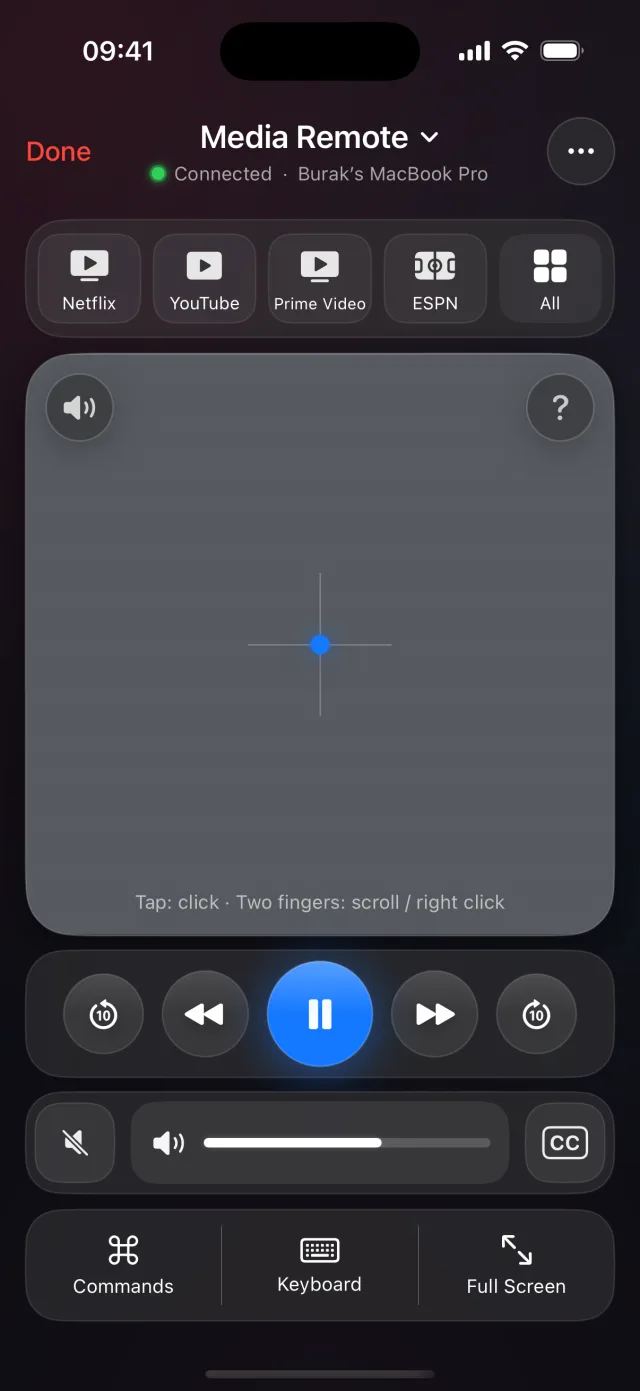
Everything you reach for on the couch
- Playback: play/pause, previous and next, back and forward 10 seconds.
- Sound: a volume slider, volume up and down, and mute.
- Picture: full screen and subtitles.
- A trackpad in the middle for the moments you need the pointer.
Works with Safari, Chrome, QuickTime Player, Music, Spotify, VLC and IINA on the Mac.
Shortcuts to your streaming apps
Keep up to four one-tap shortcuts. Netflix, YouTube, Prime Video and ESPN are there by default; swap in Disney+, Hulu, Apple TV, Max, DAZN, beIN SPORTS, Spotify, Twitch, discovery+ or Plex.
How to use your iPhone as a Mac media remote
Set up PalmDesk
Install PalmDesk on your iPhone or iPad and the free Mac app with Accessibility permission, then pair them once.
Choose Media Remote
Tap your Mac with Media Remote selected, or switch to it from any other mode.
Start playing
Open a shortcut or start anything in a supported player; the controls act on what’s playing.
Good to know
- Sound plays from the Mac and its speakers or TV; PalmDesk doesn’t send audio to the phone.
- Shortcuts open the service on the Mac; you still sign in to it there.
Questions
Can I control Netflix on my Mac from my iPhone?
Yes. Open Netflix from the Media Remote shortcut or in Safari or Chrome, then use play, pause, skip, volume, subtitles and full screen from the iPhone.
Does it work with Spotify and Apple Music?
Yes. Playback and volume work with Spotify and Music on the Mac.
Is it a replacement for an Apple media remote?
It controls a Mac, not an Apple TV. It’s built for a Mac that is connected to a TV or that you watch from across the room.
Stay on the couch.
PalmDesk 1.0 is in final preparation for the App Store. This page will link to it the day it goes live.