A presentation remote for your Mac
Walk away from the laptop. Presentation Remote turns your iPhone or iPad into a clicker with a timer, a laser pointer and your presenter notes, for Keynote, PowerPoint and decks in the browser.
Updated September 24, 2026 · PalmDesk 1.0
Quick answer
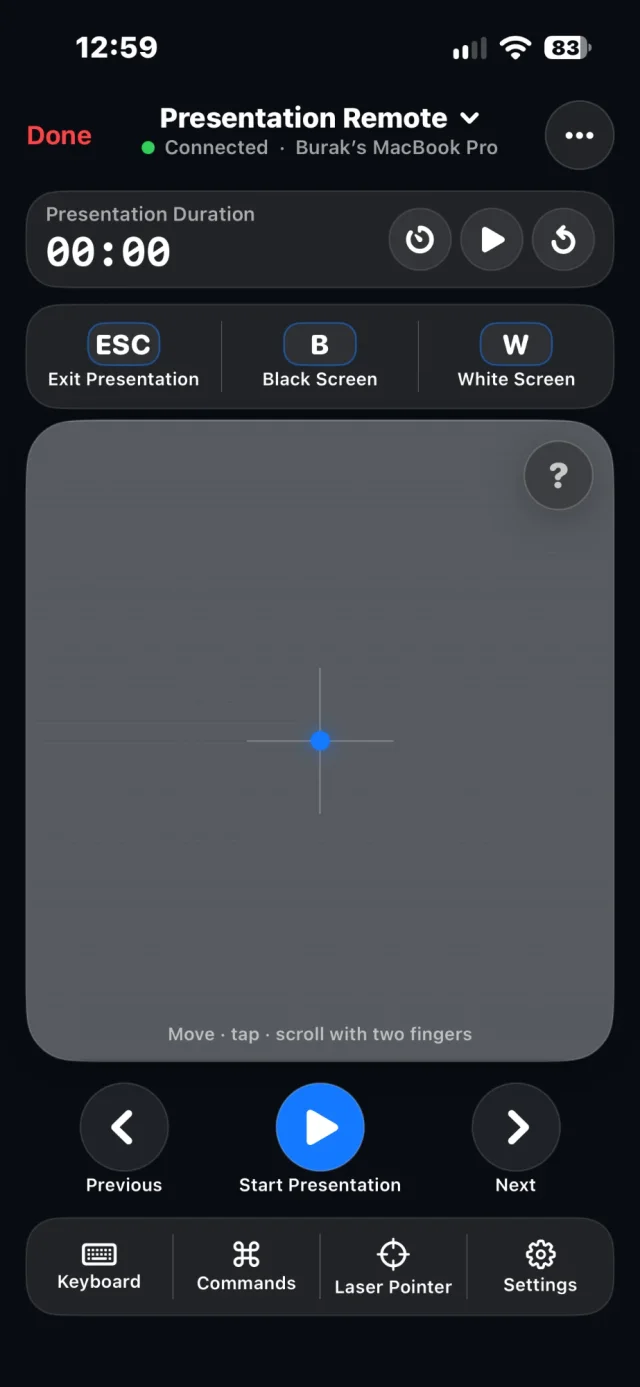
Open Presentation Remote in PalmDesk to start, advance and end a slideshow on your Mac from your iPhone or iPad. It sends next and previous, black (B) and white (W) screen, Esc and a laser pointer, shows a timer with warnings, and shows the slide number and presenter notes from Keynote or PowerPoint.
What works where
| App | Slides | Notes |
|---|---|---|
| Keynote | Yes | Yes |
| PowerPoint for Mac | Yes | Yes |
| PowerPoint on the web | Yes | No |
| Google Slides | Yes | No |
| Canva, Prezi | Yes | No |
Made for the front of the room
Timer with warnings
Set a target of 10 to 60 minutes; PalmDesk tells you when five minutes are left and when time is up.
Notes and pointer
Read the current slide number and presenter notes, or switch the panel to a trackpad and show the pointer on screen.
Black or white screen
Tap B or W to blank the screen when you want the room’s attention on you, not on the slides.
How to present from your iPhone
Open your deck on the Mac
Keynote, PowerPoint or a supported deck in the browser. Allow Automation when PalmDesk asks, so it can read slide numbers and notes.
Choose Presentation Remote
Tap your Mac on the iPhone or iPad with Presentation Remote selected.
Start and advance
Tap Start Presentation, then Next and Previous. Use B or W to blank the screen and Esc to exit.
Questions
Can I use my iPhone as a Keynote remote on a Mac?
Yes. Presentation Remote starts and advances Keynote slideshows, shows your notes and the slide number, and turns the screen black or white.
Does it work with PowerPoint?
Yes, both PowerPoint for Mac (with notes) and PowerPoint on the web in a browser (slides only).
Does it work in a conference room without the venue’s Wi‑Fi?
The iPhone and the Mac need a connection to each other: the same Wi‑Fi, which is free, or an internet connection on both with PalmDesk Pro.
Present from anywhere in the room.
PalmDesk 1.0 is in final preparation for the App Store. This page will link to it the day it goes live.