Use your iPhone as a trackpad for your Mac or PC
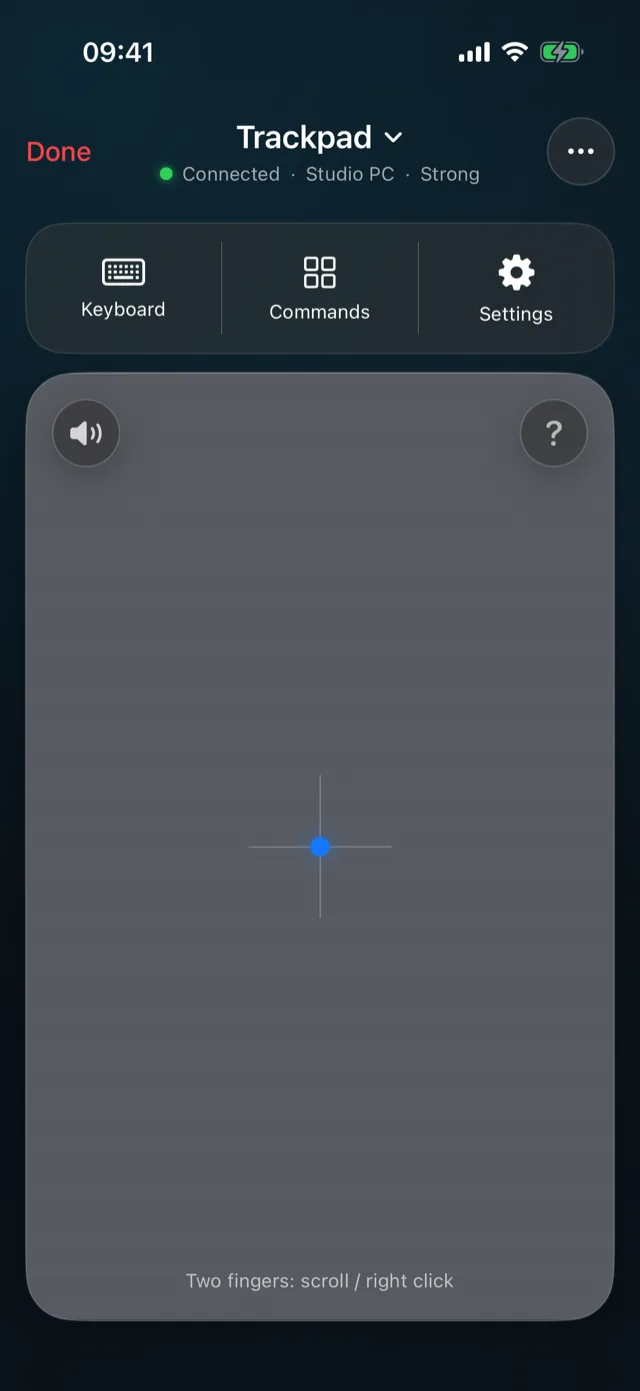
PalmDesk’s Trackpad mode turns your iPhone or iPad into a full-size trackpad and keyboard for your Mac or Windows PC, with the gestures you already use on a laptop.
Updated October 14, 2026 · PalmDesk 1.0
Quick answer
Install PalmDesk on your phone and the free PalmDesk app on your computer, pair them once, then open Trackpad mode. One finger moves the pointer, a tap clicks, two fingers scroll and right-click, and the keyboard types straight into the computer. It’s free on the same Wi‑Fi.
Gestures that work like a laptop trackpad
| Gesture | Mac | Windows |
|---|---|---|
| One finger | Move the pointer | |
| Tap | Click | |
| Two-finger tap | Right-click | |
| Two fingers | Scroll, with momentum | |
| Press and hold, then move | Drag (or turn on Drag Lock) | |
| Three-finger swipe up or down | Mission Control, App Exposé | Task View, window switcher |
| Four-finger swipe left or right | Switch Spaces | Switch virtual desktops |
Adjust Pointer Speed, Natural Scrolling, Haptic Feedback and Drag Lock in Settings.
More than a mouse
Remote keyboard
Type with your phone’s keyboard, with Esc, Tab and Return one tap away. Turn on automatic opening in Settings and it appears by itself when a text field is focused on the computer.
Quick Commands
Your windows, the desktop, search and the previous or next desktop, without leaving the trackpad. On a Mac that’s Mission Control and Spotlight; on Windows, Task View and Search.
No video, lowest latency
Trackpad mode doesn’t stream the screen. The computer stops capturing entirely, so only small, encrypted input messages travel.
How to set it up
Install both apps
PalmDesk on your iPhone or iPad, and the free PalmDesk app for Mac or Windows on your computer.
Pair once
Add your computer in PalmDesk on your phone and scan the QR code it shows, then confirm the fingerprint.
Choose Trackpad
Tap your computer, pick Trackpad as the mode, and start moving. You can switch to another mode at any time without reconnecting.
Good to know
- The computer must be awake and signed in with PalmDesk running; the login screen can’t be controlled.
- Away from your Wi‑Fi, the trackpad works over the internet with PalmDesk Pro.
Questions
Can I use my iPhone as a mouse for my PC or Mac without extra hardware?
Yes. PalmDesk uses your existing Wi‑Fi; no dongle, cable or Bluetooth pairing is needed.
Do keyboard shortcuts work?
Yes. Keys and shortcuts, with Command, Control, Option, Alt, Shift and the Windows key, are passed straight through to the computer, and Quick Commands cover the common system gestures in one tap.
Is the iPhone trackpad free?
Yes, on the same Wi‑Fi, with no time limit. Using it from another network needs PalmDesk Pro.
Does it work on iPad too?
Yes, and the larger screen gives you a bigger trackpad, in every orientation.
Your computer’s trackpad, in your hand.
PalmDesk 1.0 is in final preparation for the App Store. This page will link to it the day it goes live.