How to control your Mac from your iPhone
Apple’s own features connect a Mac to an iPad, not to an iPhone. With PalmDesk your iPhone becomes a trackpad, a keyboard, a media remote, a presentation remote and, with Pro, a live view of the whole Mac.
Updated October 14, 2026 · PalmDesk 1.0
Quick answer
Install the free PalmDesk for Mac and allow Screen Recording and Accessibility, install PalmDesk on your iPhone, scan the code the Mac shows, and tap your Mac. Trackpad, Media Remote and Presentation Remote are free on the same Wi‑Fi; seeing the Mac screen (Live Display) and connecting from anywhere come with PalmDesk Pro, with a 7-day free trial.
What Apple’s built-in features do, and don’t
| Feature | What it does | With iPhone? |
|---|---|---|
| Sidecar | Uses an iPad as a second Mac display | No |
| Universal Control | Shares the Mac’s keyboard and trackpad with a nearby iPad | No |
| Screen Sharing | Shares the Mac screen with a VNC viewer | Needs a third-party viewer app |
| PalmDesk | Live screen, trackpad, media and presentation remote | Yes, iPhone and iPad |
Sources: Apple: Use Sidecar · Apple: Use Universal Control
Set it up
Install PalmDesk for Mac
Download the free PalmDesk for Mac (macOS 14 Sonoma or later), move it to Applications and open it. It waits in the menu bar.
Allow its permissions
Screen Recording for Live Display and Accessibility for the pointer and keyboard, in System Settings › Privacy & Security. PalmDesk shows a Restart button when macOS needs one.
Pair your iPhone
Choose Add Device on the Mac, scan the QR code with PalmDesk on your iPhone and confirm the fingerprint on both screens.
Tap your Mac
Pick Trackpad, Media Remote, Presentation Remote or Live Display; switch any time without reconnecting.
 Up to 4K
What your iPhone can do on a Mac
- Trackpad and keyboard with the gestures you know: Mission Control, App Exposé and Spaces. Trackpad
- Media Remote for Safari, Chrome, Music, Spotify, QuickTime Player, VLC and IINA. Media Remote
- Presentation Remote for Keynote, PowerPoint and Google Slides. Presentation Remote
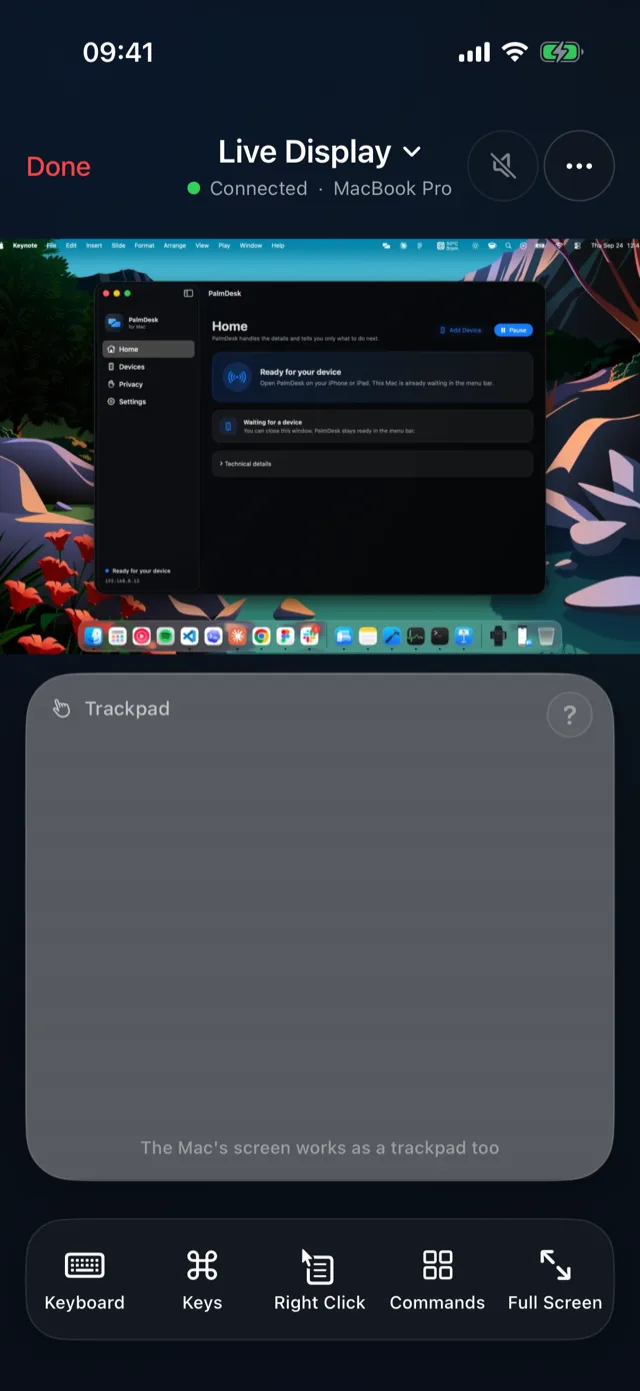
- Live Display (Pro): the Mac screen at its own resolution, up to 4K, with sound and two-way voice. Live Display
Questions
Can I use Sidecar or Universal Control with an iPhone?
No. Apple supports them with iPad only. To control a Mac from an iPhone you need an app such as PalmDesk.
Can I see my Mac’s screen on my iPhone?
Yes, with Live Display, part of PalmDesk Pro: each display, the active window or one window, up to 4K, with touch control and the Mac’s sound.
Can I control my Mac from outside the house?
Yes, with PalmDesk Pro. The connection is end-to-end encrypted and finds its way through most networks without port forwarding.
Can it wake my Mac or use the login screen?
No. The Mac needs to be on and awake with a user logged in and PalmDesk running.