Control Netflix on your laptop from your iPhone
Laptop plugged into the TV, you on the couch: PalmDesk’s Media Remote puts play, pause, volume and subtitles on your iPhone, for Netflix and the other players on your Mac or Windows PC.
Updated October 14, 2026 · PalmDesk 1.0
Quick answer
Install the free PalmDesk app on your laptop and PalmDesk on your iPhone, pair them once, and choose Media Remote. Tap the Netflix shortcut (or start Netflix in your browser), then play, pause, skip, change the volume, turn on subtitles and go full screen from the iPhone. It’s free while both are on the same Wi‑Fi.
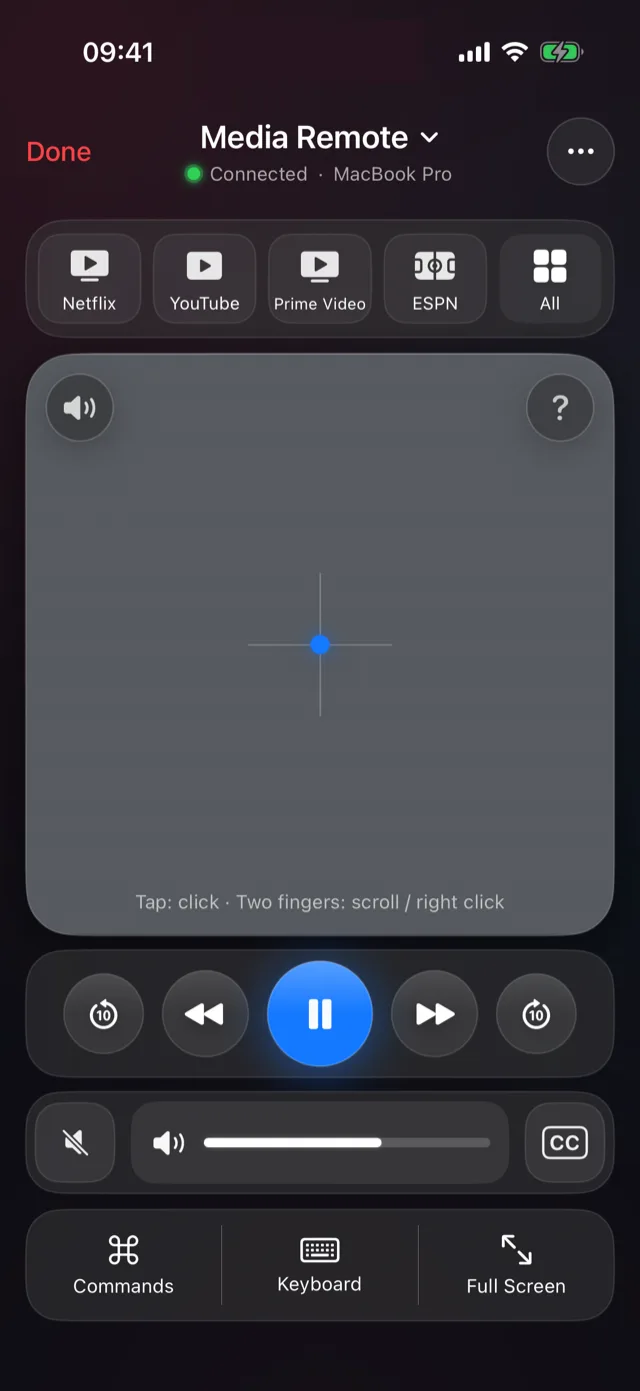
What you can do from the couch
- Play and pause, previous and next, skip back and forward.
- Volume with a slider, up and down, and mute.
- Subtitles and full screen in one tap.
- A trackpad in the middle for the moments you need the pointer, such as choosing the next episode.
How far a skip jumps depends on the player.
Set it up
Install PalmDesk on the laptop
The free PalmDesk app for Mac or Windows. On a Mac, allow Accessibility when asked.
Pair your iPhone
Choose Add Device on the laptop and scan the QR code with PalmDesk on your iPhone.
Choose Media Remote
Tap the laptop with Media Remote selected, then the Netflix shortcut. You still sign in to Netflix on the laptop.
Works with more than Netflix
Keep up to four one-tap shortcuts: Netflix, YouTube, Prime Video and ESPN by default, or Disney+, Hulu, Apple TV, Max, DAZN, beIN SPORTS, Spotify, Twitch, discovery+ and Plex. The controls work in Chrome, Edge, Firefox and Brave, in Safari on a Mac, and in apps such as Spotify and VLC.
Questions
Does the sound come out of my iPhone?
No, in Media Remote the sound stays on the laptop and its speakers or TV. To hear it on the iPhone, open Live Display (PalmDesk Pro).
Is it free?
Yes, on the same Wi‑Fi, with no time limit and no ads.
Does it work with a TV box or smart TV?
No. It controls a Mac or Windows PC, such as a laptop connected to a TV.